Engineering simulations, whether for stress analysis, computational fluid dynamics (CFD), or multiphysics models, generate large volumes of structured and unstructured data. And let’s be honest, sifting through folders full of .csv files or manually copying outputs into spreadsheets isn’t exactly anyone’s idea of a good time.
Integrating databases such as Excel or SQL database integration into these workflows ensures consistency, traceability, and scalability. Instead of manually copying results between spreadsheets, engineers using engineering simulation tools can automate parameter management and post-processing.
TL;DR – How to Integrate SQL Databases with Engineering Simulation Tools
Why Should Engineers Integrate SQL Databases into Their Simulation Workflows
You might be wondering: Isn’t storing simulation data in folders enough? Well, it might be, at least for a while. But as your projects grow more complex, and multiple engineers start running different versions of simulations, things can get messy fast. Integrating a SQL database brings order to that chaos.
Key benefits of integrating simulation software with enterprise databases include:
• centralized and consistent data storage across teams and projects;
• simplified version control for model parameters and results;
• automated reporting and data retrieval through SQL queries;
• scalability for high-volume simulations in enterprise environments;
• seamless collaboration between engineers, analysts, and managers.

Common Engineering Simulation Tools That Support Database Integration
Okay, this sounds great, but can a simulation tool even talk to a SQL database? Good news: most modern engineering simulation platforms offer native or script-based SQL and Excel database integration. They allow engineers to automate data exchange, parameter setup, and results collection, showing which simulation tools offer Excel and SQL database integration in practice.
Finite Element Analysis (FEA) Tools
Platforms like Ansys, Abaqus, and COMSOL Multiphysics are widely used for structural, thermal, and electromagnetic simulations. Most of them support scripting languages like Python or MATLAB, which can be used to push and pull data from SQL databases. For example, you can write a script to pull material properties directly from a database into your model setup.
Computational Fluid Dynamics (CFD) Tools
Simulation environments like Fluent, OpenFOAM, and STAR-CCM+ often deal with massive datasets. By linking to a SQL backend, you can automate parameter sweeps, store simulation outputs, or track convergence histories. Some of these tools even have APIs specifically for data access and automation.
Multiphysics and Co-Simulation Platforms
Tools that model multiple interacting physics or integrate with control systems, such as Simulink, Modelica-based platforms, or custom co-simulation setups, can benefit greatly from a database acting as a central hub. You can store everything from input tables to co-simulation logs in one location.
Bonus: Custom Tools & In-House Scripts
Many teams develop internal solutions using Python. Adding SQL database integration through libraries like sqlite3 or SQLAlchemy allows these scripts to communicate directly with enterprise data sources. Whether you’re using out-of-the-box features or scripting your way there, chances are your simulation tool can work with a SQL database… You just have to plug it in.
SQL Powers Engineering Simulations Comparison
| 🛠️ Tool name | 🎯 Primary Use | 💻 Scripting Support | ✨ Key Features |
| Ansys | FEA | Python, MATLAB | Material property retrieval |
| Abaqus | FEA | Python, MATLAB | Automated model setup |
| Fluent | CFD | Python | Parameter sweeps automation |
| OpenFOAM | CFD | Custom | Massive dataset handling |
| Simulink | Multiphysics | MATLAB | Centralized data hub |
| Custom Python Tools | Custom | Python | Flexible SQL libraries |
How SQL Databases Enhance Simulation Workflows
Enterprise-level engineering simulation workflows often require handling terabytes of data efficiently. SQL databases offer the backbone for structured storage, quick retrieval, and integration with business intelligence tools like Power BI or Tableau.
Managing Simulation Inputs with SQL Tables
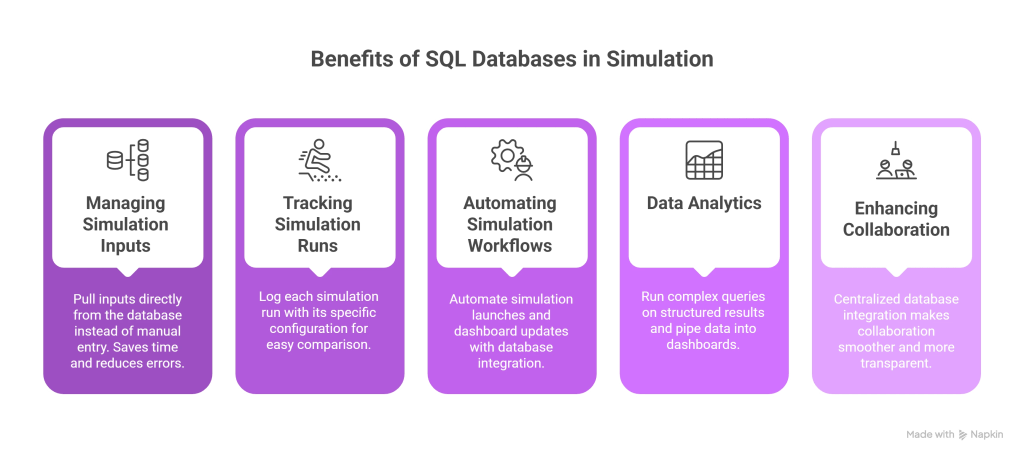
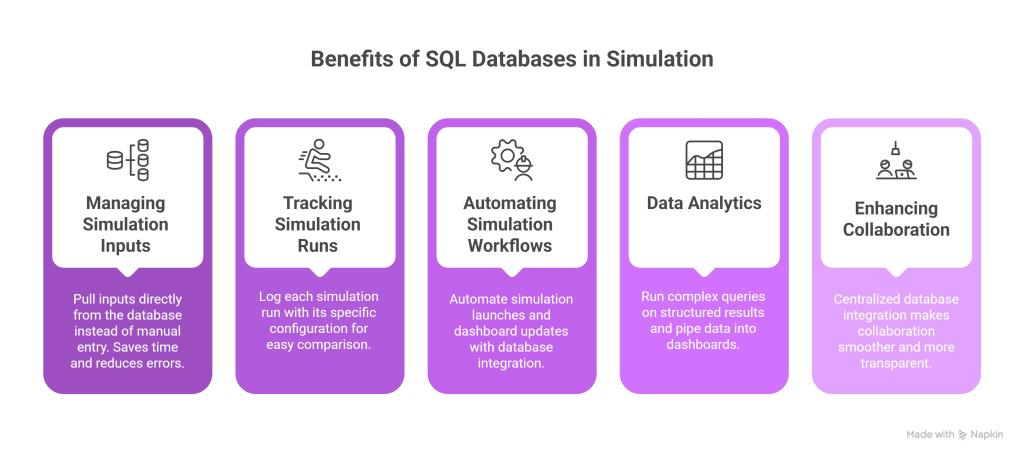
Instead of manually entering values into your simulation every time (or worse, copying them from spreadsheets), engineers can use SQL tables to manage boundary conditions, geometry, and material properties. This form of database simulation saves time and improves consistency.
Tracking and Organizing Simulation Runs
Running multiple simulations with slightly different inputs? A database lets you log each run with its specific configuration – like a recipe book for your experiments. You can easily compare results, roll back to previous setups, or see which combination gave you the best outcome.
Automating Simulation Workflows with Database Integration
Once your inputs and results live in a database, automation becomes simple. Scripts can launch simulations when new data appears — a clear example of how simulation platforms handle high-volume data for enterprise applications.
Leveraging SQL Databases for Simulation Data Analytics
Want to plot how stress distribution changes across different materials or how pressure drop varies by geometry? With structured results in SQL, you can run complex queries and pipe that data into dashboards (using tools like Power BI, Tableau, or even Jupyter notebooks). Goodbye, endless .csv files – hello instant insight.
Enhancing Collaboration Through Centralized Databases
Centralized database integration makes collaboration across teams smoother and more transparent. Engineers, analysts, and managers can access the same datasets, track modifications, and maintain accountability throughout the simulation lifecycle.
How the SQL Databases and Engineering Simulation Tools Integration Works
Okay, let’s lift the hood and see what this actually looks like in practice. In some cases, your simulation tools can connect directly to a SQL database using built-in APIs or Python scripting. In larger setups, middleware or ETL pipelines help extract, transform, and load data. You don’t need to be a software architect to set this up, but it helps to understand the moving pieces.
Architecture example:
[SQL Database] ⇄ [Middleware Script / API] ⇄ [Simulation Tool] ↑ (Optional: Dashboard or Scheduler)
This illustrates how integrating databases supports automation, visualization, and scalability.
Direct Integration
In some cases, your simulation tool can connect directly to a SQL database. For example, using built-in APIs or scripting languages like Python, you can fetch input values or push results directly into your database. Think of it like your simulation tool talking to the database in real time.
Middleware Scripts
More commonly, there’s a script or application sitting in between. These are often custom-built using Python, MATLAB, or even Java. They handle things like:
- Reading input parameters from SQL
- Launching the simulation with those parameters
- Collecting results and writing them back to the database
This approach is flexible, and you can build in logic for batch runs, parameter sweeps, or even error handling.
ETL Pipelines (Extract, Transform, Load)
For larger organizations or research groups dealing with a high volume of simulation data, ETL pipelines are the way to go. Here’s how it works:
- Extract: Pull raw simulation data (e.g., text files, log files, mesh results)
- Transform: Clean it up – filter noise, convert formats, normalize values
- Load: Push the structured data into your SQL database
It’s a bit more complex, but super powerful – especially if you’re dealing with thousands of simulation runs or need to feed data into business intelligence tools.
Architecture example:
[SQL Database] ⇄ [Middleware Script / API] ⇄ [Simulation Tool] ↑ (Optional: Dashboard or Scheduler)
This illustrates how integrating databases supports automation, visualization, and scalability. You can even layer dashboards or reporting tools on top of the database to give stakeholders quick access to insights, without needing them to open the simulation software at all.
Best Practices for Integrating SQL and Simulation Tools
So you’re ready to hook up your simulation tools to a SQL database, awesome. But before you dive in, here are some best practices to make sure your integration is clean, reliable, and future-proof.
Step 1: Design a clear data schema for simulations, parameters, and results
Start with structure. Map out what your tables should look like – inputs, simulation metadata, results, logs, users, and so on. The clearer your schema, the easier everything else becomes. For example:
- A Simulations table for run IDs, timestamps, user names
- A Parameters table for input variables
- A Results table for key output metrics
Step 2: Maintain data integrity with validation and foreign keys
This isn’t just about neatness – it’s about avoiding mistakes. Use constraints (like foreign keys), data validation (e.g., no negative temperatures unless they make sense!), and transactions to make sure the data going into your simulations is solid.
Step 3: Automate repetitive operations to reduce manual work
You don’t want someone manually copying and pasting every new input set into a SQL query. Build small automation scripts, maybe one to fetch new jobs from the database, another to push results back in. Once it’s set up, running simulations can feel as easy as clicking a button.
Step 4: Optimize performance with proper indexing and batch inserts
Large simulation datasets can be heavy. To keep your queries fast and responsive:
- Index columns you search often (like timestamps or run IDs)
- Avoid storing huge raw files directly in the database – store file paths or summaries instead
- Use batch inserts instead of row-by-row updates when uploading results
Step 5: Secure access through roles and permissions
Especially in team or production environments, don’t overlook access control. Set up proper user roles: engineers can read/write simulation data, analysts can read results, admins can do both. And yes – please back up your database regularly!
What Challenges Arise During Database Integration in Simulation Environments and How to Solve Them
Alright, so integration sounds great on paper – but like any good engineering project, it comes with a few bumps in the road. The good news? Most of these are totally manageable if you know what to expect.
Challenge 1: Data Format Mismatch
Simulation tools often output data in strange, inconsistent formats – especially when you’re working with mesh files, result logs, or custom solvers.
Solution: Use transformation scripts to clean and normalize your data before it hits the database. Tools like Python’s pandas, MATLAB, or even small command-line scripts can help reshape outputs into clean, table-friendly formats.
Challenge 2: Performance Bottlenecks
If you’re storing large datasets (especially high-resolution results), the database can slow down – particularly when querying or visualizing results.
Solution: Avoid storing full result fields unless necessary; save key KPIs (like max stress, avg pressure, etc.) and keep full fields in external files (with references in the database). Index wisely. Use proper indexing on frequently queried fields like simulation ID or parameter sets.
Challenge 3: Too Many Manual Steps
If people still have to manually trigger simulations or update the database by hand, it defeats the purpose of integration.
Solution: Automate! Use job schedulers or cron jobs to launch scripts that watch for new entries in the database and trigger simulations, log results, or notify users. Bonus: integrate with email or Slack for alerts.
Challenge 4: Collaboration Confusion
When multiple people interact with the database, overwrites and inconsistencies can creep in – fast.
Solution: Implement access controls and user roles. Use time-stamped logging to track who changed what and when. If you’re advanced, set up versioning for your input data using triggers or dedicated version tables.
Challenge 5: Team Learning Curve
Not everyone on your team may be familiar with SQL or database workflows.
Solution: Start small. Document the workflows clearly. Provide basic training or even build a simple interface (using a tool like Streamlit or a web form) so less technical users can still interact with the system without writing SQL queries.
Case Study: How Context-Clue Enhances Engineering Data Management
In real-world scenarios, engineers spend significant time managing data rather than interpreting results. In those cases, SQL database integration remains a powerful way to structure and automate simulation data. But here’s a surprise: it’s not the only option.
Modern engineering simulation tools can also connect to knowledge management platforms such as ContextClue. These systems act as an intelligent layer on top of enterprise data, linking simulation results with process documentation, design intent, and lessons learned from previous projects.
Unlike traditional database simulation setups, which focus on storing numeric results and parameters, knowledge base integration enables engineers to capture the “why” behind simulation outcomes — assumptions, decisions, and validation notes. This connection transforms raw simulation data into actionable organizational knowledge.
For example, a virtual commissioning model integrated with a system like ContextClue allows teams to simulate process changes while automatically referencing historical insights, component data, and risk assessments stored in the knowledge base. The result is a richer, context-aware simulation workflow:
- 40% Faster Virtual Commissioning: Engineers quickly retrieved and validated critical information;
- 30% Cost Reduction in Engineering Effort: AI-assisted search reduced manual work;
- 50% Reduction in Downtime Risks: Engineers preemptively identified conflicts before physical deployment.
FAQ: Integrating Simulation Software and Databases
What is database simulation in engineering?
Database simulation refers to using structured data systems like SQL to manage and automate engineering simulation workflows.
What are the benefits of SQL database integration?
It improves scalability, ensures traceability, and reduces manual work in managing FEA/CFD models.
Which tools support both Excel and SQL?
Ansys, Abaqus, Fluent, OpenFOAM, and Simulink offer direct or script-based support for Excel and SQL integration.
How do simulation platforms manage high-volume data?
Through ETL pipelines, data indexing, and modular database architectures.
Updated version from May 5, 2025.